Software product

Jinshu · The AI writing partner that remembers your world-building

Anyone who has written long fiction with a general-purpose AI knows the drill: by chapter five it has forgotten the protagonist's name, by chapter thirty you are scrolling back to find that planted detail, and every chapter needs reminders to update character states.

Jinshu doesn't. Characters, foreshadowing, plotlines, locations, and what the reader already knows are all remembered; it looks things up before writing and checks its own work after.

Remembers the settings, tracks the foreshadowing, checks its own work

Runs locally. No account, no telemetry · Privacy policy

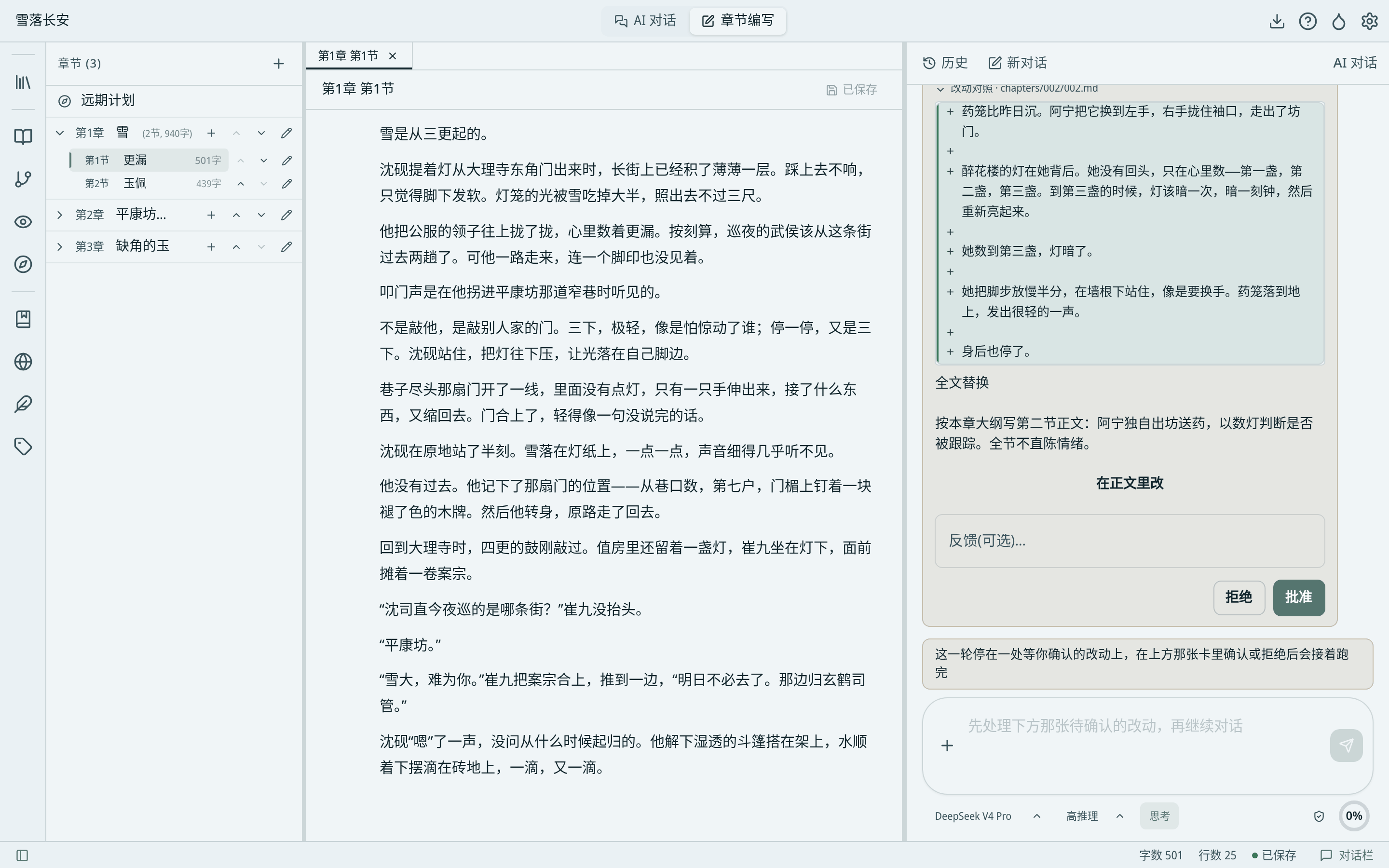
Jinshu writing view: chapters on the left, manuscript in the middle, AI chat and pending revisions on the right

Comparison

How it differs from a general-purpose AI chat

General AI chatJinshu
Settings and backstoryRe-explained at the start of every chatCharacters, relationships, foreshadowing, plotlines, locations, and reader knowledge are all remembered
RevisionsA fresh block of text with no visible changesEvery change marked word by word; applied only when you confirm, and nothing is lost if you close without confirming
Finding earlier passagesScrolling chapter by chapter yourselfMeaning-based search across the whole book — it finds the passages where “the pendant” appeared before writing a new chapter
After finishing a chapterIt does nothing unless you remind itAutomatic checks: did characters change, was the foreshadowing paid off, should the plot advance
Writing styleRepeated pleading15 built-in writing methods, plus style distilled from works you admire
Reference materialPasted into chat, forgotten next turnStored in a reference card box the AI can search and read — but it never writes your notes for you
Your own editsOverwritten next turnIt re-reads before writing, so it sees what you changed yourself
What the AI remembersInvisiblePlain text files you can open and edit anytime

Features

What it looks like

The AI looks up, writes, and checks

Before writing, it reviews the character bible, searches foreshadowing, and reads earlier chapters. After each chapter it checks item by item: character changes, unpaid setups, plotlines to advance. Big jobs like reviewing or reading the whole book are split into parallel tasks that report back to you.
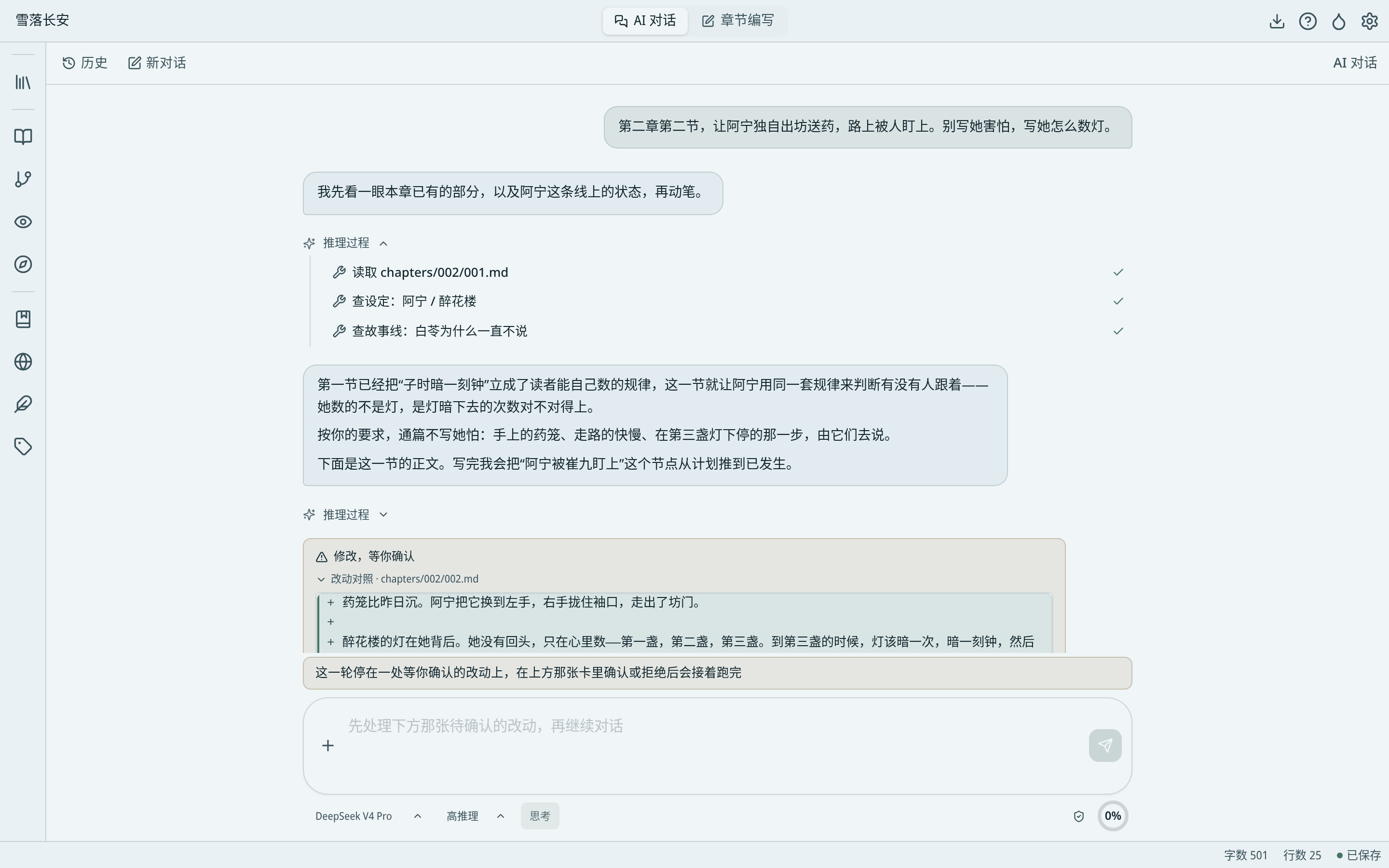
AI chat showing how it searches material and writes

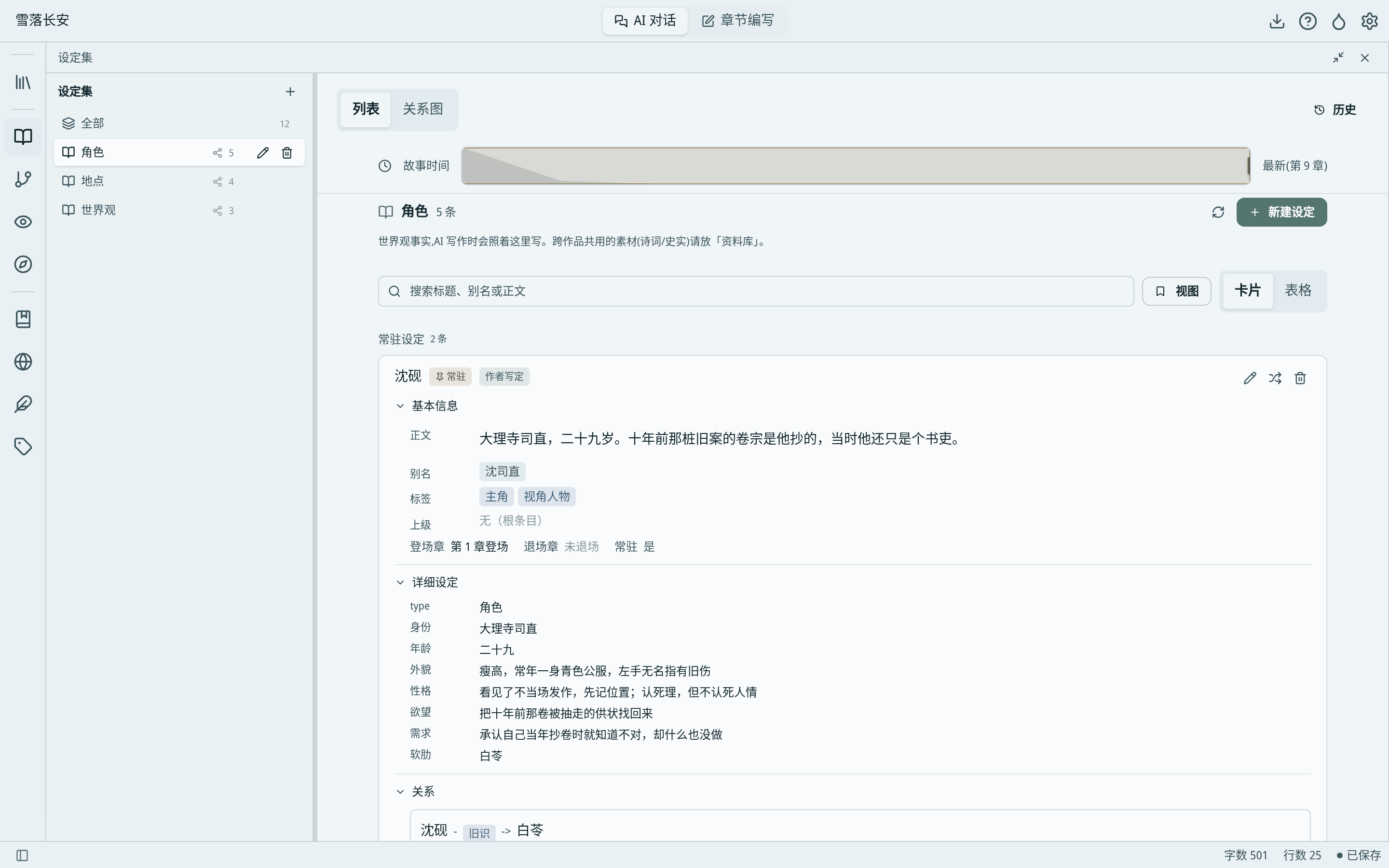
The character bible is a relationship graph

Characters, locations, factions, tokens, passwords — all on one graph. Every change is tied to a chapter; drag “story time” to see how relationships looked at chapter N.

Character bible: character details, relationships, and story time

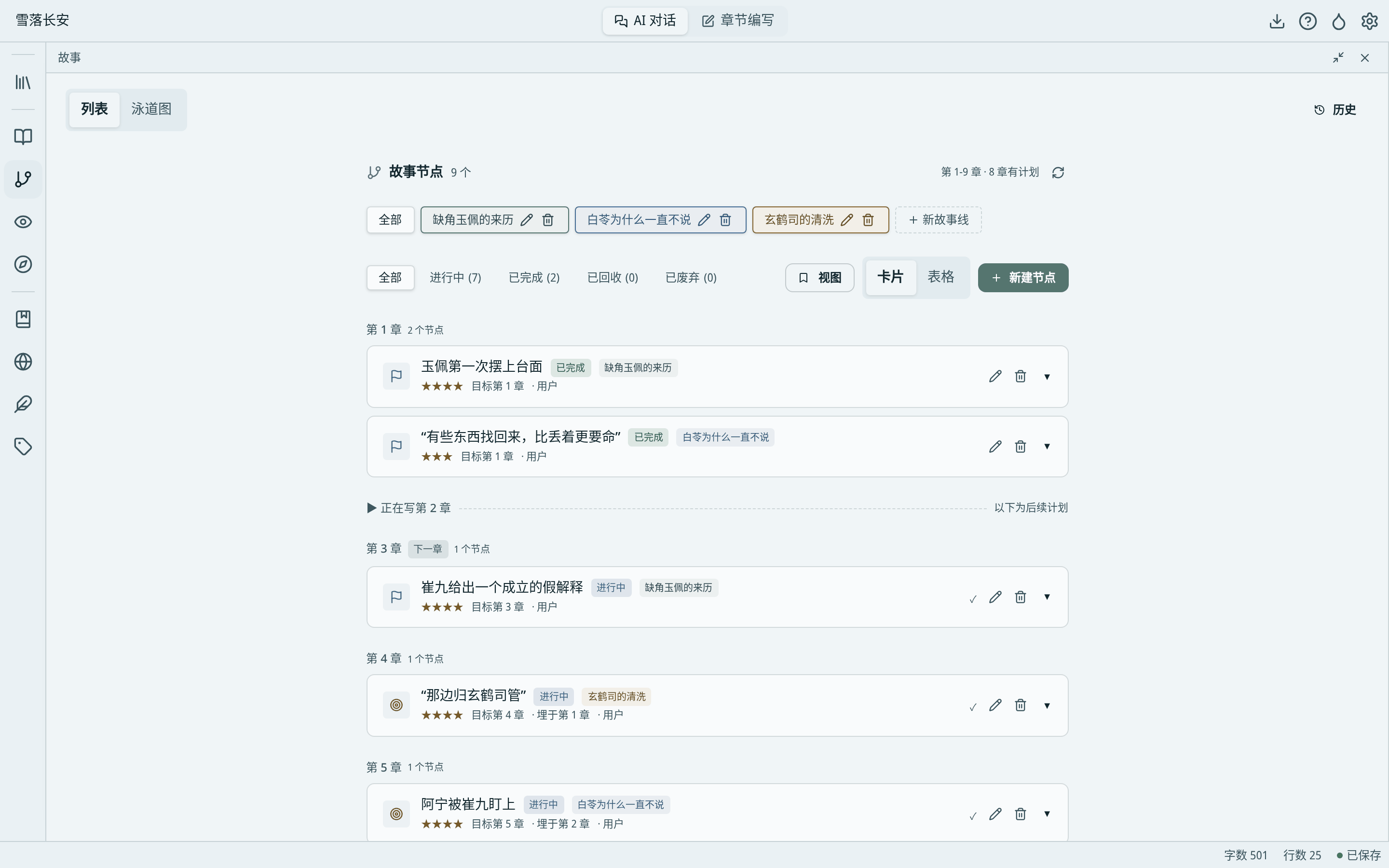
No foreshadowing lost at sea

Each plotline is a chain of nodes: milestones and planted setups. Every plant records which chapter it was planted in and where it should pay off; after each chapter the ledger is checked, paid-offs ticked, misses flagged, and imminent payoffs announced.

Story nodes: milestones and foreshadowing arranged by chapter

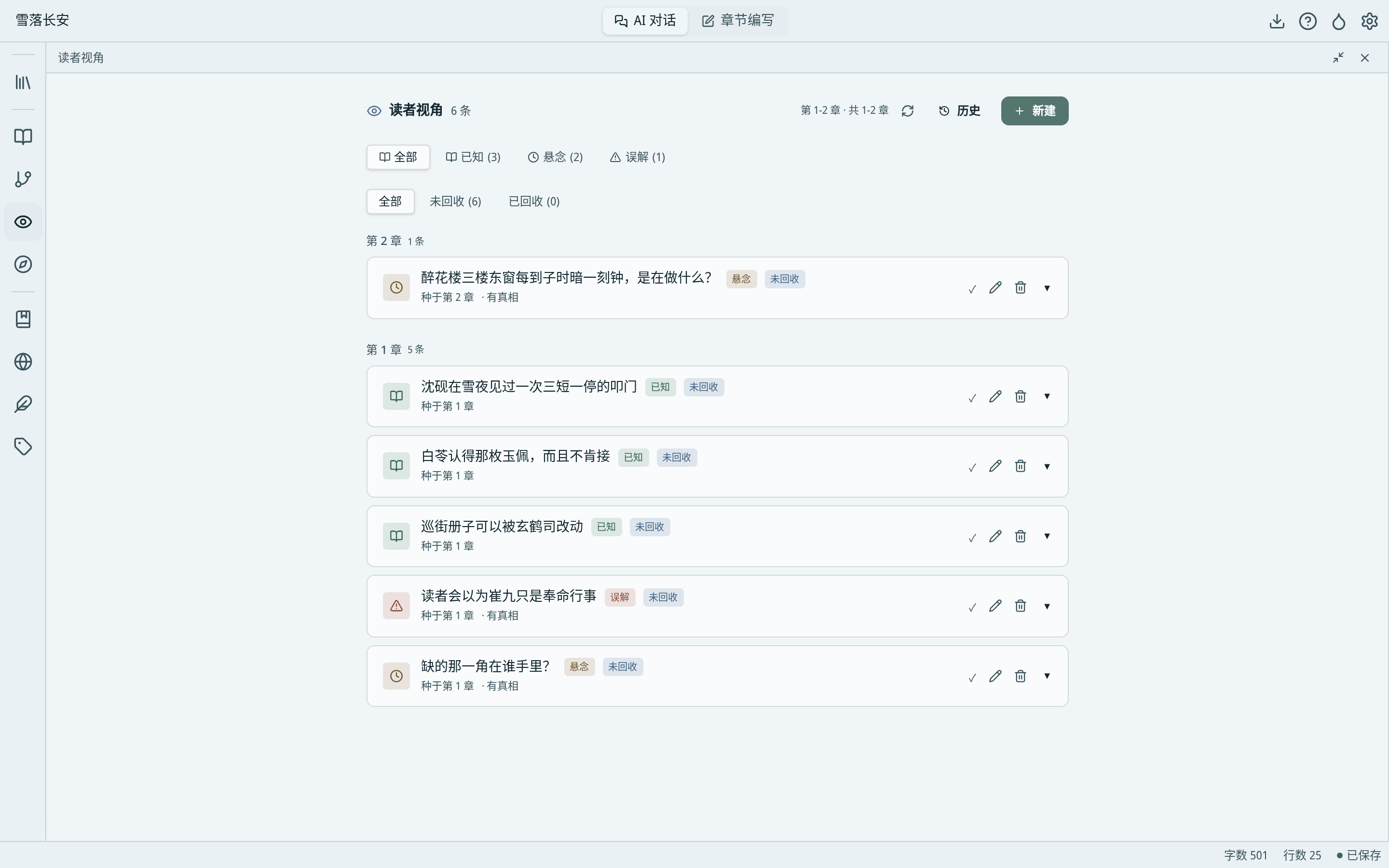
Control what the reader knows

Track what the reader knows, what answer they are waiting for, what they misunderstand — and where each was planted and revealed. Write “the reader believes he acted on orders” while recording the truth beside it; suspense and twists stay in your hands.

Reader view: known facts, suspense, and misunderstandings

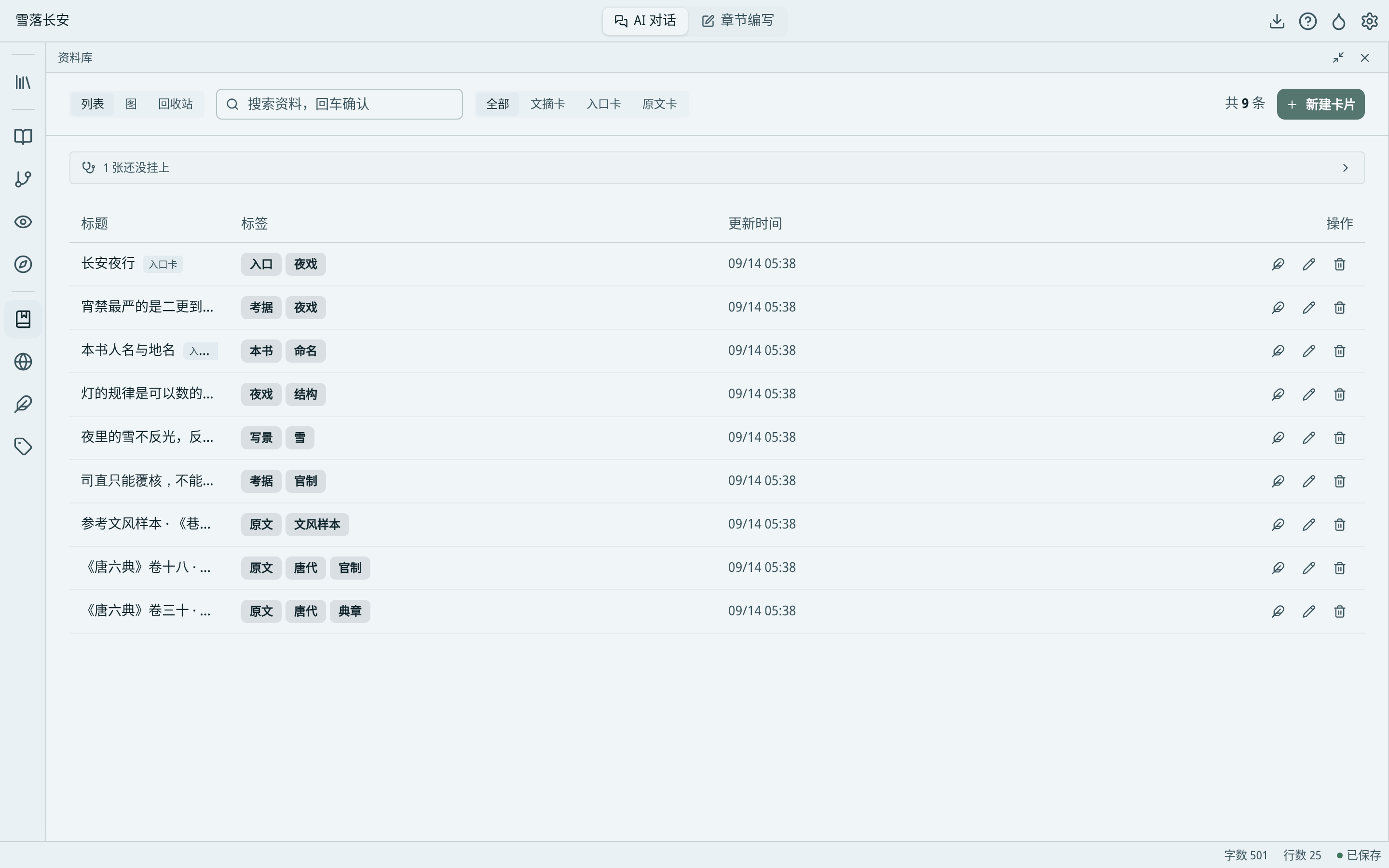
Reference card box

Research notes, reference works, names and places — anything not tied to one book lives here and serves all works. The AI can search and read them, but your reading notes stay yours.

Reference card box: source text, reading notes, and topic entries

Capabilities

And more

  • Find earlier passages by meaning

    In chapter fifty, looking for the scene where the protagonist first saw the pendant? One sentence finds it, even if the word “pendant” never appears. The search runs on your computer.

  • Two ways to write

    Chat mode for discussing settings and outlines; chapter mode for prose, with chapters, text, and AI side by side.

  • One-click workflows

    Chapter outline, prose, end-of-chapter review, full read-through — start with one sentence and it follows fixed steps to the end.

  • Say it once, remembered forever

    Requirements like “keep the dialogue cold” take effect once and still hold in chapter thirty-seven. Overused phrases are noted and actively avoided.

  • Writing methods

    15 built-in methods; add your own and they take effect immediately.

  • Visible AI memory

    Everything the AI records — progress, suspense, reminders — is a plain text file you can open and edit.

FAQ

You might be wondering

What is Jinshu for?

Long fiction and serialized web novels with many characters, many threads, and long writing cycles. The longer the work, the more remembering settings and tracking foreshadowing pays off.

How is it different from just chatting with a general AI?

General AIs forget the backstory after a few turns and hide their edits. Jinshu records characters, foreshadowing, and plotlines, looks them up before writing, checks its own work, and marks every revision word by word for your confirmation.

Will the AI write the book for me?

It can draft prose, rewrite paragraphs, and check consistency — but every change applies only after you confirm. What gets written, and how, is always your call.

Which AI does it use? Does it cost money?

Jinshu connects to DeepSeek, Alibaba Bailian, Zhipu, MiniMax, StepFun, Kimi and other services with the API key from each platform; you pay that platform directly under its rules.

Does it need the internet? A GPU?

Chatting with the AI needs the internet. Meaning-based search runs locally with no GPU; its model file is about 600 MB and downloads with one click.

Where are my manuscripts stored? Are they used for training?

Manuscripts live by default in a Jinshu folder under your Documents folder — ordinary files you can back up anytime. We never receive your manuscripts; what happens to content you send to an online AI is governed by that provider's terms. See the Jinshu privacy policy.

Which platforms?

Windows and Linux today; no macOS build yet.

Another tool

Guanlan · Watch your knowledge flow

An AI research assistant that lives on your computer. Point it at a folder to ask questions, organize cards, draw link graphs, build slides.